Showing posts with label How To. Show all posts

Wednesday, 23 March 2016

  How To Access Your Chrome Passwords Remotely From Any Browser

How To Access Your Chrome Passwords Remotely From Any Browser


Google has introduced a new online feature where a user can sync its passwords to Google and access Chrome passwords from any browser. But to access this feature, you will need to sync your Chrome password first.


Most of the times, even if we have many browsers installed on our PC, we still use only one of them. Since it’s launch, Google Chrome has become one of the favorite browsers of the internet users. Using only one browser, most of the times, make us also store our passwords at the same place.
However, in certain situations, if you still want to use the Google Chrome passwords from any browser, here are the steps on-


How to access Chrome Passwords from any browser:

You need to use Google Passwords through which Google will keep all your Chrome passwords with it on a specific URL and you can access Chrome passwords from there. So, follow the following steps to activate Google Chrome password service:
  • Go to Chrome ‘Settings
  • Sign into Chrome
  • Click ‘Advanced Sync Settings
  • Select ‘Encrypt synced passwords with your Google credentials


And now, wait for a few minutes for the data and password to get synced online.

Access Chrome Passwords from any browser Now:

  • Once you are already signed in, you can see all of your passwords.


Did you find this helpful? Let us know if you are aware of any other Chrome tricks and tips in the comments below.

How To Get The Best Wi-Fi Signal In Your House

How To Get The Best Wi-Fi Signal In Your House


If you want to increase your Wi-Fi speed, the first criteria would be to get the best Wi-Fi signal. There is no way out where you can leverage your Wi-Fi data without getting the best Wi-Fi signal with a good strength. fossbBytes has come up with an article covering all the aspects of getting the best Wi-Fi signal by telling you how interference, Wi-Fi channel, the line of sight etc. matters.


Getting the best Wi-Fi signal in your own house is like finding a solution to come out of the maze while being stuck in the maze. We take our Wi-Fi router for granted and we just place it anywhere knowing that all of us are getting the internet connection.
Since we are all paying for the data usage, it’s our right to utilize the Wi-Fi to its fullest which we ignore because we take life as it comes. So, we have come up with some tricks and tweaks on how can we get the best Wi-Fi signal in our house.

How to Get the Best Wi-Fi signal in your house:

  • Put the Wi-Fi router ideally in the central location of the house as a Wi-Fi router extends the Wi-Fi signal in every direction.
  • Avoid keeping the Wi-Fi router in one of the corners of your house because more than half of our Wi-Fi signals are ended up providing connections in the neighborhood.
  • If your data port lies on one of the corners of the house then consider running a long ethernet cable to the center of the house, it does not cost much.
  • Remember, any solid structure like a wooden wall or a concrete wall are impediments to the Wi-Fi signal.
  • Do not forget the Wi-Fi antenna. They have some serious effect on the quality of the signal you receive. If you have not one, better buy one to get more coverage and stronger signal.
  • You can use a plenty of apps available out there for free of cost to measure your Wi-Fi signal strength. This way, you can easily decide the perfect or at least, close-to-perfect location for your Wi-Fi router.
we have covered some of the important points on how a Phd scholar named Jason cole derived some results on the Wi-Fi signals on a mathematical modeling mapping of his flat and here are some of the results:
  • Wi-Fi router should be kept in line-of-sight to your device to get a strong Wi-Fi signal.
  • Dark spots are the points in our room where Wi-Fi signals get canceled out after reflection. So if you are not getting a good signal at a particular location, try switching your position a little bit. Here is the video explaining that: 
  • Many materials absorb a quite bit of the signals and a concrete wall absorbs the most.
  • Some of the things which should be avoided when planning to keep a Wi-Fi router nearby are:
    • Concrete wall
    • Water body like an aquarium, the little fountain, microwave etc.
  • A vertical antenna position helps make a better in horizontal space and Vice versa to get the best Wi-Fi signal.
Besides, the above observations which are mostly based on the physical locations of placing a Wi-Fi router, there are some other technical tweaks which help you improve your Wi-Fi router’s performance. Some of the tricks to get a strong Wi-Fi signal are:
  • Update router firmware
  • Choose correct wifi channel
  • Disconnect old devices from Wi-Fi router
  • Replace antenna
  • Restarting your router etc.

How to choose the best channel for your Wi-Fi router?

These days every other house has their personal Wi-Fi routers. These intelligent routers have the capability of choosing the best channel for a better performance but sometimes, that does not work as the perfect solution.  This article talks about the different channels, their frequency range, co-channel, channel interference and also running some diagnostics test on Mac and Windows to find the right channel for you.
I hope this article on how to get the best Wi-Fi signal in your house has been informative as it talks about all the aspects of a Wi-Fi.

WiFi router like interference, channel etc. If you are also aware of some tricks which are capable of boosting the Wi-Fi and getting us a strong Wi-Fi signal, kindly share that in the comments below.

Tuesday, 22 March 2016

How To Get Android N Preview Right Now On Your Phone — Android 7.0 Nutella

How To Get Android N Preview Right Now On Your Phone — Android 7.0 Nutella


Google has just announced the release of Android N Developer Preview program. It allows you to get the Android N (I’m calling it Android Nutella) over-the-air updates. In this article, I’ll be telling you how to get Android N Preview right now on your phone. Read more to know about the new features and get the preview on your device.
Out of nowhere, Google announced the release of Android N(utella) Developer Preview today (Yes, we are betting heavy on Android Nutella). It was expected that Google would release the very first Android N Preview around its I/O developer conference in May, but the company decided to surprise everyone.

Android N Developer Preview is the earliest preview yet

Through a Medium post (sorry, Blogspot), Hiroshi Lockeimer, Google’s SVP for Android, Chrome OS and Chromecast, told the world that the Android team wished to release the preview earlier than ever to gather more data from developers and improve the final product.
He said that this will also ensure that Google will be able to prepare for the final release to the OEMs later this summer. With this extra time, developers will be able to bring Android N support to all their apps and OEMs will be able to spread the new sweet delicacy easily.

Android N Preview available over-the-air

To make the testing process hassle free, Google has made the preview available as an over-the-air update. This means that you won’t have to flash a freshROM and wipe the entire device — just like Apple’s beta program.
This means that developers will be able to install the Android N Preview on their phones just like the regular phone updates from their carrier. However, Google states that the preview is not meant for everyone and people should install it on their secondary devices. A consumer preview will be available for download as Android N gets closer to its final release.

Biggest changes and features in Android N Preview

  • Multi-window support
  • Quick Settings Tile API
  • Notification enhancements
  • Data Saver
  • Android TV recording
  • ICU4J APIs
  • Support for more languages
  • Accessibility enhancement
  • Number blocking
  • Call screening
  • Direct boot
  • Key Attestation
  • Network Security Config
  • APK signature scheme v2
  • Scoped directory access
  • Default Trusted Certificate Authority
  • Doze on the go
  • Android for Work update
    • Always-on VPN
    • Work profile security challenge
    • OR Code Provisioning
    • Toggle Work Mode
    • Disable access to apps
    • Remote Reboot
    • Enterprise Process Logging
    • Remote Bug Reports
    • Device health monitoring
    • Certificate management

How to get Android N Preview right now and install it on your device?

Method 1: Android N OTA update

The company has launched its Android Beta Program to deliver the updates over the air. Starting today, you can update your devices — Nexus 6, Nexus 5X, Nexus 6P, Nexus Player, Nexus 9, and Pixel C — via OTA updates.
For getting OTA Android N updates and enrolling your Android device, visit the Android Beta Program website.
Note that if you enroll in the program and later choose to opt-out of receiving the updates, all the user data will be removed.

Method 2: Android N Image Download

If you wish to download the Android N Developer Images and install it manually, you can get them via following links and control the updates yourself.
With this method to get Android N Preview, all data from your device will be removed. So, you are advised to make a backup of your user data. Note that using this method, your phone won’t receive additional OTA updates and you’ll have to install future previews manually.

Android N Preview images download link:

How to install Android N Preview images?

You can follow the detailed instructions here on developers.google.com/android and install Android N on your device. The same page also tells the instructions about how to uninstall Android N Preview from your device.

What will be Android N’s name — Android Nutella?

We believe that it would be “Android Nutella” this time around, because here’s Lockheimer dropped another hint at the end of his Medium post:
So, the burning question that’s on everyone’s mind: what will the N release be named? We’re nut tellin’ you yet.

Thursday, 17 March 2016

Increase your 16 GB iPhone Memory to massive 2128 GB

Increase your 16 GB iPhone Memory to massive 2128 GB

You can upgrade your 16GB iPhone to massive 128GB in just $60

Tip: If you are low on storage then this video is definitely for you

Despite taken huge strides in its mobile operating system, Apple has prevented the storage on its iPhone to be expandable through a microSD card. This has caused a lot of problems for consumers, but profitable for Apple as it rakes in huge revenue for the company. This is because Apple generally charges a $100 premium if you want to upgrade the storage of your iPhone by choosing another model.
However, in just 30 minutes, this video shows how easy it is to increase the storage of your smartphone from 16GB to 128GB and best of all, it only cost the gut $60 to make it all happen. China’s Shenzhen market is where all the magic takes place, but in order for you to increase your storage, you will need to have a fair amount of trust when you give your iPhone to be upgraded. This is because your smartphone is going to be torn down and by removing the memory chips inside and replacing them with high capacity ones, you will be able to carry around all of your media for the foreseeable future.
Keep in mind that while this will effectively increase your storage from 16GB to 128GB, it will void your warranty. However, if your iPhone’s warranty period is already over, you should give this a try at your own risk. The engineers replaced the existing memory chip, which belongs to SK Hynix and replaced them with a Toshiba flash memory, and as stated earlier, the entire process took just 30 minutes. After a couple of intricate steps, it should also be noted that the data was not wiped clean and was present inside the phone just the he left it.

Wednesday, 2 March 2016

Boost WI-Fi signals with Beer Cans!

Boost WI-Fi signals with Beer Cans!

 Out of the box thinking proves more valuable than exhaustive drudgery. Depicted in this amazing lifehack, is one example that how you can boost your WiFi signal with just an empty beer can.
In case you are in an agonising pain due to your age old WiFi router’s signal and are thinking of getting a new one, pause for a moment and read this: A humble ‘beer can’ can boost your WiFi signals up to double or triple levels.

Now, if you are not shocked, that means you already know the physics behind this crazy lifehack. But if you are surprised to hear that the ‘beer can’ could be as amazing and useful as the stuff inside, then read further.

Creating a crazy fast router is a big deal, but people might be reluctant to spend big bucks on the new technology. However, improvising with what is already available is more appealing. Like this one where you could use a beer can boost your WiFi signal and get more than the glimmers of the Internet beacon at your favorite corner in the house. All you need is some beer, err beer cans.
Cut the beer cans as shown in the video and place it over your router’s antenna. Since the antennas are omnidirectional (sending signals in all directions), the aluminium would act as a reflector and give a particular region in the house a huge boost in the WiFi signals. However, one side would get obstructed so you would have to adjust the positioning of the antenna.
There are other ways to boost your WiFi signals like choosing correct WiFi channel and simple tweaks to improve your WiFi router’s performance.
Watch the video and tell us how much the “beer can” helped you to boost your WiFi strength?

Friday, 5 February 2016

How to become a Game Designer in India- Step By Step Guide

How to become a Game Designer in India- Step By Step Guide

Nearly all of us have played video games as children and some of us continue to do so as adults. But have you ever wondered how such a complex piece of software is made? What kind of knowledge and skills are required to make a “good” game? Well, if you have ever wanted to get into the game of making a game, maybe you would want to look at game design as a career. Interested? Read on!

    In the recent years, the demand for a game designer has increased at an unprecedented pace. This is an exciting career path that lets your show creativity and create the roots and aesthetics of a game. A game designer works on the graphics, animation, and CGI to bring the games closer to reality.
    Over the past decade, the game designing industry has ditched its male-dominant tag and more women have entered this field. Talking about the first step, if you are really interested in the field, you need to go to college and get a bachelor’s degree in computer engineering, computer science, arts, animation, or graphic designing. If you find a specialized program in game designing, go for it.
    To become a game designer, you need to have strong command over programming languages like C, C++, Perl, Assembly, and Lua.

    If you are wondering about the money that you can make after entering the field, let me assure you that it’s pretty impressive. According to the US Bureau of Labor Statistics, the mean annual wage for artists and animators in the U.S. was $72,400 as of May 2013. The top 5 states for annual mean wages were:
    • California: $88,150
    • Washington: $76,900
    • Washington D.C.: $76,110
    • New York: $72,530
    • New Mexico: $70,310
    Here’s an enriching infographic by Schools.com that tells you how to become a game designer step-by-step and earn big bucks:

    What It is, What it isn't?


    Game design is the craft of knowing how hurling disgruntled birds on a stack of pigs can actually be fun for millions of people on the planet while making a franchise worth billions of dollars. Well, kind of.

    Academically speaking, you could say that Game Design is an art and a science. It is the art of envisioning the storyline, content and rules of a game; while it is the science of examining the psychology of the player and his relationship with the game. In short, game design involves figuring out what will get a player hooked to a game and what won’t… and creating games that will work.

    So who is the mastermind that uses game design theories to create a successful game? (drumroll please): the Game Designer!

    A Game Designer is someone who has a vision of what the game is as it goes through iterations during its development cycle. Any game you see in the market is usually the brainchild of a Game Designer. You could say that he is the one who makes sure that a Half life game plays and feels like a Half life game. He doesn’t design the artwork or do the programming: he is to a game what a director is to a movie—he can make or break a game concept. 

    In fact, contrary to popular belief, Game Design doesn’t just mean designing video games for PC/Consoles... it could also mean designing board, card or live action games. Game Design is also used by companies to ‘gamify’ less interesting activities for their employees or customers.

    Myths and Expectations

    So, first things first: Game Design isn’t Programming. Game Design isn’t Character Design or Animation. Game Design isn’t Story Writing for Games and Game Design surely isn’t Game Testing. If you have been a die-hard gamer and you think you would want to make games because you can play games—you would be disappointed to know that it doesn’t qualify you to become a Game Designer. Yes, being a gamer does help. However, a Game Designer has to enter the industry with minimal bias towards all kinds of games; Games that are played by players from varied age groups, genders and geographies; on varied platforms and with varied play times. 

    As a Game Designer it’s unlikely that your first project will be a God of War 4 or a similarly huge AAA blockbuster title. It’s likely, that at the start you may be working for studio as a Trainee or Associate Game Designer. Most Game Designers have to start off on smaller design tasks like balancing how much gold a player gets in a certain area of a game or designing levels in projects before they are given the responsibility of envisioning the entire game. Let’s face it, you are new and a lot of time and money is at stake.

    State of the Gaming Industry

    The gaming industry in India is about to hit a boom. However, the production houses in India are mostly into smaller scale projects on platforms like Web / Mobile / Flash / HTML5. But no need to be disheartened, there are some bigger studios who work on cutting-edge 3D games for PC / PS3 as well. And the rest of the studios have essentially applied the Indian IT industry model of taking outsourced projects to sustain their businesses.

    At the same time, the global gaming industry is pretty much awaiting a massive change. Social gaming on Facebook has already jumped the shark. Mobile gaming is gaining a stronghold as smartphones become cheaper and more powerful and more and more people are connected via 3G. Today, India and China are seen as the next targets that need to be specifically cracked. While publishers may argue that localized games and content are needed to pierce such a tough market like India with such diverse demographics, there are designers who say that there is nothing that can be called “Games for India”. Games are games. When my mom played Temple Run, she didn’t look at the obvious references to media like Indiana Jones or Uncharted, and still she plays it much better than me and enjoys the game fully. The reason being, the game didn’t alienate her. So, such a market barrier can be resolved by making the game more accessible.

    The Position of a Game Designer

    So, what is it that a Game Designer is supposed to do? Well, the Game Designer is like the MBA of the gaming industry. An MBA graduate goes through 36 subjects over 2 years ranging from Mathematics to Economics to Taxation laws. The same holds true for a Game Designer. Apart from knowledge of designing games, a Game Designer is expected to have understanding of Art / Aesthetics, Programming, Project Management, Culture, Languages, Sound Design / Music etc. You will be the only person who will have a complete vision of the game in the team and you will have to work with Programmers, Artists, Project Managers and even other Designers to bring the game to life. Knowing a thing or two about such topics removes unwanted friction in communication. And since you are a creative person, it is desirable for you to also have a reasonable amount of exposure to varied media such as Movies, Music, Comics, Anime / Manga, TV Shows etc. At the end of the day, making games is a business and you are supposed to make a game that people will be willing to pay for. Games are cultural products and you cannot even accidentally offend people of a certain country because you didn’t know something in your game is considered distasteful in their culture—cultural awareness is necessary.


    When do I start becoming a Game Designer? Is it too late for me?

    OK, so you are finally starting to get a better picture in your mind about this and you think you want to make games. But wait... you are already working somewhere and it is not a game studio. Is it too late now? The simple answer is NO! Back in my Game Design school, we had students aged 17 to 32; one student being a lawyer-turned-Game Designer with a PhD. All that matters is passion coupled with practicality. If you are determined, you could always explore by learning things on your own. There are a lot of books, resources and videos on this topic. One could easily experiment with the wacky new ideas one may have and even prototype them if they know a programmer or can program themselves. 

    Your typical work routine

    Every designer has a different style of work and every game studio will have a different work-culture and expectations. But, at the end of the day, a major chunk of your work is actually communication. Before the start of any project, Game Designers typically make documents called Game Concept or Pitch Documents which are small 1 or 2 page documents describing - say - a new idea for a Shooter game. This is the time when a Game Designer has to be an excellent salesman with remarkable showmanship—enough to convince his peers and the investors alike. Every studio has its due process of selecting game concepts which could be produced. Yes, there is no lack of ideas in this industry. You work with teams of extremely talented and creative people and everyone has their own ideas of the game they would like to have made and work on. Normally, peer review and business feasibility are benchmarks for selection of such a game. Once a game enters production, Designers work on a document called the GDD or the Game Design Document. A GDD, is sort of like a bible of the entire game. It describes everything about the game right from the story to the UI to the Characters to the Gameplay. The purpose of such a document is to communicate to the team as to how the game will play. So, your Programmer is confused how high the character should jump? The Level Designer is confused how the Boss level will play? The Artist wants to know how big the boss is? All these questions would be normally answered in a GDD. And as teams grow to numbers in the hundreds and the production spans for 3-5 years for the bigger AAA games, it becomes crucial to have a one-stop ready reference for such games. Also, it is handy for newcomers in the team to be able use the GDD to know about the game rather than approach the Game Designer for every little doubt they may have. Point to be noted - apart from tuning the gameplay and brainstorming with your team for ideas, most of your time would be spent in documenting details about the game in relevant document using Microsoft Word.

    Also, in this industry you have to keep up with the rest. Strength wise, it is a very small industry and everyone knows everyone. You will almost certainly work with a lot of people you meet in one or the other form. Later on in your career, you would essentially need to network with other Developers around the world and go to events like GDC, Casual Connect, PAX etc. to get some exposure.

    As of today, in India - NASSCOM Gaming Forum on Facebook is a hangout place for the local Game Developers. It’s a nice place to talk to professionals and get advice and even share ideas.


    How do you convince your parents if you are too young?

    “And how much does your girl / boy earn?” This is the age–old question parents (especially in India) dread. There is one thing the better part of this industry expects you to have - an attitude where you don’t work for money but for the craft of it. Of course, it’s not like they are not going to pay you. But you will be hired for your work. No certificate from any school or college is going to get you into this industry. Your 98.23% in SSC will not ensure a job in this industry and neither will being an IITian. Nothing but your work can. You develop your skills, your score a nice job, you get paid handsomely, it is that straightforward. Especially in India, unlike Engineering, there is NO standard pay scale for a Game Designer. It may range between 20k a month to more than a lakh depending on your skill. And if the very first question you ask is “What is the package?” you won’t be treated very well. It could be your second question, this industry expects passion first!


    Options: Schools, Self-Learning, Mentoring?

    Now then, what are your options if you want to train yourself to be a Game Designer? The good news is that there is no predetermined path to this career.

    In India, your options are limited. An unbiased personal recommendation as an author of this article would be DSK Supinfogame, Pune which happens to be my alma-mater. The reason being their approach towards educating you in this craft is 100% practical. They train you via projects (that become a part of your portfolio) and by the time you graduate - you know how to work in teams and make projects possible and design really good games. Their faculty comprises professionals from western gaming industry and they seem to know what they are doing. I can’t recommend any other school (most Indian schools confuse Game Design and Game Art themselves!). Digipen, VFS and CMU are other schools abroad that will provide the kind of education that you need. Also, try to make sure the program is practical and that it is at least two years in duration.

    What to avoid?


    1. A school that says that they will teach you Game Engines (Let’s describe these as “software/middleware used to make games”) should sound alarms. A Game Designer knows how to be resourceful enough to learn things on their own. Approach a school that teaches you how to work with the tools rather than just teaches you the tools.

    2. Any guarantee of salary packages, getting jobs, internships and placements should sound alarms. There are a lot of ‘Diploma-mills’ cropping up in every nook-and-corner of the country trying to make a quick buck off kids who are just excited about gaming and parents who are worried about salaries. A lot of such institutes even end up hiring their own alumni for meager pay-scales. A good school will have enough reputation in the market to not need to shout from the rooftops. Check their alumni and their achievements. They expect you to be good enough to score internships and jobs on their own. Remember, there is no scarcity of jobs, only scarcity of right people for the jobs.

    3. Avoid schools which rely a lot on theory. You can get that anywhere for free, even YouTube. The job of a good Game Design school is to not to teach you but rather provide conditions for you to learn in and at times, even pressure you. There is a lot more to Game Design than just design, there is people management, project management, ego management and so much more. All of this will make you ready to work on a live project in a Studio.

    Alternatively, you could go head-on and join as a trainee or a Game Tester and work your way up the ladder. That gives a totally different kind of conditioning and working style. And relies heavily on learning using low risk live projects and proving your mettle.

    And lastly, you could go lone wolf, where you try to do as many things as you can on your own (with some collaboration) and release games on your own too. This involves a lot of investment and patience and it will keep you hungry for a while before your hard work starts paying off. In any case, all three approaches rely heavily on self learning and differ only on the basis of how much time and money you invest and what you expect from yourself.

    Future Opportunities – Is the sky really the limit?

    So, you are a Game Designer now. Where do you go from here? Well, two things come into play at this stage. The first is knowing that you will never stop learning as a Designer. The second is knowing what you want from your career. Do you see yourself making this unique game no one else seems to have made? Go ahead, gather a team, inspire others with your idea and start a studio. Get a prototype running and approach a publisher (in the same way a writer would approach one for funding / marketing / development / distribution) to pitch your game to. Even though this stage normally comes in at 3-10 years of work experience, depending on how enterprising you are, you don’t always need to start your own company to see your ideas come to fruition. If the idea is good and you sell it well, your studio could fund it. But nothing should stop you from doing the same either. 

    Good luck! 

    The writer is a professional game designer working in the Indian gaming industry.


    Thursday, 22 January 2015

    Guide: How to use Whatsapp on Web

    Guide: How to use Whatsapp on Web

    WhatsApp Web
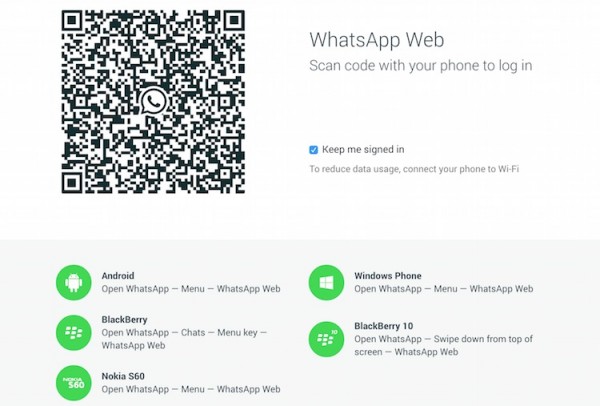
    Now that WhatsApp is finally available on the web, meaning that yes, it’s available for your PC and Mac, how do you get it to work? Update the app on your mobile phone, load the WhatsApp Web page, scan the QR code and you’re good to go.
    Having problems with the update? Here’s a quick guide to help you out.
    First up, if you don’t see WhatsApp Web on your phone, go to the respective store and perform an update. WhatsApp Web is available for all platforms except iOS no thanks to Apple’s “platform limitations”. So yes, your Android, Windows Phone, BlackBerry, and even Nokia S60 devices are all supported.
    1. Make sure you have the latest version of WhatsApp installed on your Android, Windows Phone, BlackBerry or Nokia S60 phone.
    1. Open WhatsApp on your mobile phone. Tap on the menu button, look for “WhatsApp Web”, and tap on it.
    WhatsApp Web AndroidWhatsApp for Android. It should be similar for other platforms
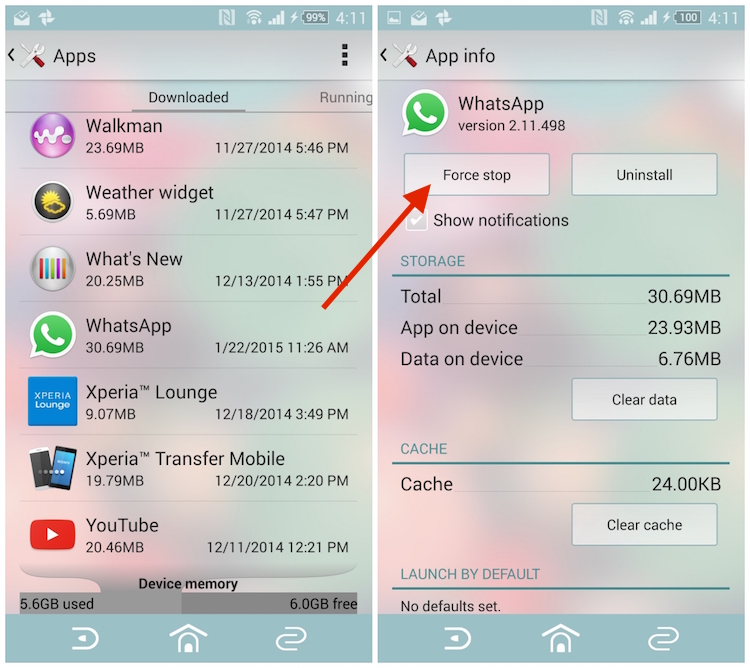
    1. If you don’t see WhatsApp Web even though you have the latest version, Android users can force stop the app in the settings menu. Go to Settings > Apps and look for WhatsApp in the Downloaded apps section. Tap on Force Stop and confirm your action by pressing OK. When you open WhatsApp again, you should be able to see “WhatsApp Web” in the menu
    WhatsApp Force Stop

    Force stop WhatsApp on Android. For other platforms, try restarting your device

    1. Open up https://web.whatsapp.com on your Google Chrome browser on your computer. You will be greeted with a QR code (make sure it is indeed a secure page with “https”. To be 100% sure, type the URL manually on your Google Chrome browser)
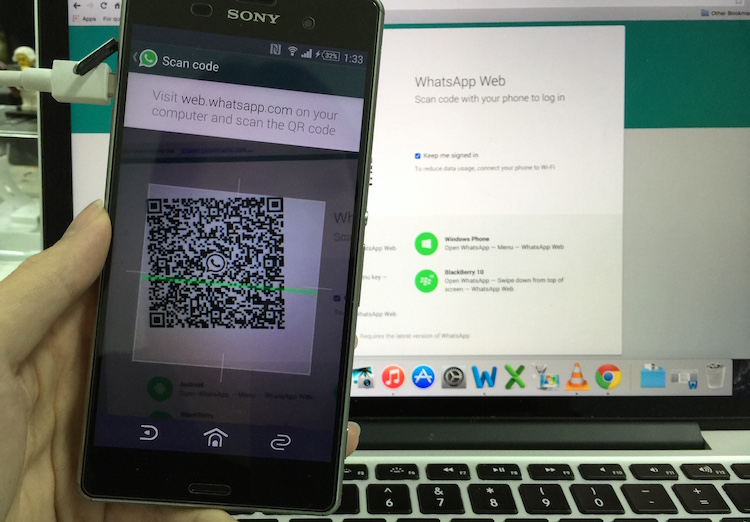
    2. Scan the QR code on your computer using WhatsApp on your phone
    IMG_0208
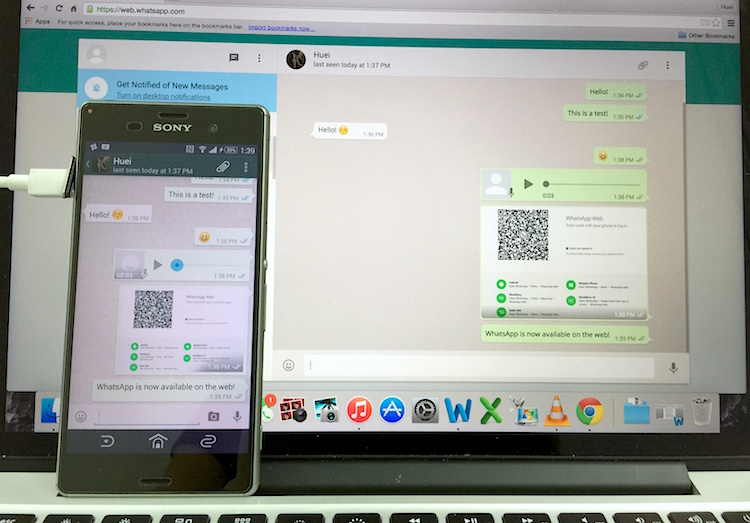
    1. Once scanned, you’ll immediately see your chat logs right on the browser itself. Make sure you’re connected to Wi-Fi because it will sync your entire chat log to your computer. Fortunately, audio clips and pictures require you to click to download, so at least it won’t take too long.
    You will be able to view your entire chat log that is on your phone right from your computer. This means that if you need to retrieve a message from months ago, it’ll take some time and is highly dependent on your internet connection.
    IMG_0212
    In addition, all the messages you send and receive on either platform – web or mobile phone, will be synced onto the other platform almost immediately. Just like on your mobile device, new files/pictures and audio clips will automatically load when someone sends them to you. Click into a picture and you will be able to download it to your computer.
    Whatever you see on the web will be almost identical to whatever that’s on your phone. This means that you can get your contact lists right from WhatsApp Web to start a new conversation. Attaching a file works just the same – you can browse for a picture or capture one using the web cam on your device. Of course, you’ll need to grant the web page access to your camera and microphone.
    WhatsApp for WP with WhatsApp Web SupportWhatsApp v2.11.634 for Windows Phone
    Can’t find the WhatsApp Web option on your mobile? Check for the latest WhatsApp onWhatsApp’s website – AndroidBlackBerryWindows PhoneNokia S60.

    Wednesday, 10 December 2014

    How To Jailbreak iOS 7

    How To Jailbreak iOS 7

    Jailbreaking your iPhone or iPad is a risky process that we can't unreservedly recommend, but it remains popular among those who wish to install unofficial apps (such as those on the Cydia marketplace) on their smartphone or tablet. Here's how to jailbreak your iPhone or iPad in iOS 7 - and iOS 6 and earlier. 
    (What is jailbreaking? In essence it means bypassing the locks put in place by Apple on its iPhones and iPads, and thus gaining access to a large number of apps that Apple hasn't authorised. 

    How to jailbreak an iPhone: A warning

    But first... Some of the unofficial apps that you'll get access to after jailbreaking are pretty tempting, and may offer features you'd never otherwise be able to access;blocking a phone number on an iPhone, for instance, wasn't possible officially untiliOS 7 launched, but an app on Cydia (where you can download apps for jailbroken iPhones and iPads) let you do it easily. Read: Pros and Cons of jailbreaking an iPhone.
    Cydia on iPhone

    How to jailbreak an iPhone: Cydia is the app that lets you browse and download further unofficial apps

    So why doesn't everyone jailbreak? Well, for one thing it's by no means straightforward, as we'll see shortly. Jailbreaking is also legally ambiguous, risky, and prone to void any warranties you have with Apple. We advise you to think long and hard before going ahead with the jailbreaking process.
    Apple itself offers advice on the subject of jailbreaking (although you may feel that the company is biased in this respect, since it wants to continue getting its cut of the revenue from official app sales). In this tech note Apple suggests that jailbreaking your iOS device may lead to security vulnerabilities, instability, shortened battery life, unreliability, disruption of services and inability to apply future software updates. It may result in Apple denying service for your device.
    Nonetheless, many Apple fans have been jailbreaking iOS devices for years without encountering these issues. But once they've jailbroken such a device, they understand that they should expect no help from Apple if it causes them trouble in the future. With choice comes responsibility.

    How to jailbreak iOS 7 (and iOS 6 and earlier)

    We had to wait for a bit, but the jailbreak tool for iOS 7 has been launched by the Evasi0n team. (The Evasio0n team offer one word of warning, however: "Over The Air updates of iOS 7 are known to create an issue and make the jailbreak fail. Some devices are then stuck on the Apple Boot Logo. Until we fix that, please restore your device to 7.0.4. with iTunes first.")
    UPDATE: iOS 7.1, which is still in beta, is set to close the loophole that allows Evasi0n's iOS 7 jailbreak tool to work. Bear this in mind when considering whether to update your operating system to iOS 7.1 when the full version comes out.
    Before you start, back up your iPhone or iPad, and switch off the passcode (at least for the duration of the jailbreak process).


    Before jailbreaking, be sure to back up your data
    You'll need to download the Evasi0n7 tool, which is available for Mac OS X and Windows, and is compatible, the makers claim, with all models of iPhone and iPad running iOS 7.0 to iOS 7.0.4. The tool is available from mirrors on evasi0n.com
    Download evasi0n for Mac
    Downlaod evasi0n for Windows
    Double-click the .dmg file to decompress it and an evasi0n window will appear on your desktop. Drag the evasi0n application out of the window to the desktop and launch it.
    Connect your iOS device and click the Jailbreak button. evasi0n will retrieve some information from your device. The device will then reboot and prepare itself for the jailbreak. Don't do anything with your device during this stage.
    evasi0n begins its work
    evasi0n will now install Cydia - the application that provides access to third-party apps - on your device. When instructed to by evasi0n, unlock your device by pressing the Home button and swiping the Slide to Unlock switch to the right. You should see a new Jailbreak icon on your Home screen. Tap it and evasi0n will carry on with the final stage of the jailbreak. You can now quit evasi0n by clicking the Exit button.


    Don't touch your device until evasi0n tells you to
    Your device will reboot, briefly display the evasi0n screen, show the Apple logo, and then show the evasi0n screen again, which details the progress of the jailbreak installation. Finally, your device is ready for you to use in the normal way.
    The one difference you'll see is a Cydia icon on the home screen. Tap it and Cydia launches, prepares its file system, and then quits. To then use Cydia as intended, tap its icon once again, choose your user type (User, Hacker, or Developer), tap Done, and the Cydia interface loads.
    The version of Cydia you're using may need updating; older versions of Cydia may not support Cydia's newer third-party apps. To do that, tap the Changes icon at the bottom of the screen and then tap Refresh in the top left corner. If any updates are available (as evidenced by green check marks) tap the Update button in the top-right corner of the display. Cydia will download the latest updates and reboot the device.
    What you choose to install is entirely up to you. Some people choose to install OpenSSH so that they can remotely access the device's file system via a standard FTP client. However, if you enable this feature, be sure to change your device's root password from the default "alpine," which is used by all iOS devices. Fail to do so and others around you could hack into your device. To learn how to change the password, tap the Root Password How-To link on Cydia's About screen.


    Cydia is now in the house

    How to jailbreak an iPhone: Future updates of jailbreaking tools

    There was a decent wait between Apple releasing iOS 7 and a jailbreaking tool being released for the system - most likely because iOS 7 represented a more substantial update than most new versions iOS. As Apple releases minor and major updates to iOS, new jailbreaking tools (and updates to tools) will be released too, but there may again be a wait.
    If you want to keep track of when jailbreak tools are launched in the future, two useful options are following @evad3rs on Twitter (that's the account used by evasi0n), and checking out the jailbreaking section on Reddit.
    In the mean time, look out for scammers. Lots of unscrupulous companies and individuals claimed to have cracked iOS 7 before a reliable tool was released by the Evasi0n team, and offered to give you the jailbreak for a sum of money - often $50.

    How to jailbreak an iPhone: tethered and untethered jailbreaking

    Finally, some words on jailbreaking terminology.
    Jailbreaking has been in a largely dormant state since the release of iOS 6. In that version of the mobile operating system, Apple closed many of the avenues that had once been used to crack iOS open.
    Tethered jailbreaks require you to attach your iOS device to your computer and run an application to jailbreak it. If you later power off the device and then restart it, the jailbreak is wiped out, and you have to repeat the entire process.
    These kinds of jailbreak were the first to be developed. But what prospective jailbreakers wanted was an untethered method, where the hack would remain in effect even after the device was switched off and on again.
    That untethered jailbreak arrived in the form of evasi0n. Like jailbreaks before it, evasi0n doesn't unlock an iPhone (which would allow you to use the device with multiple carriers). Rather, it simply allows you to install third-party apps not approved by Apple via the Cydia store we mentioned earlier.
    an iphone wraped with chains
    Enjoy and don't forget to comment!